
A real parser, not a model call
Sections, case tables, priorities, defect tags, the environment notes, and appendices are read by a deterministic parser, so the same document always gives the same plan.
A markdown test plan is a good document and a bad instrument. Assay keeps the document and adds the instrument: import the plan, run it step by step, and share the queue with agents.

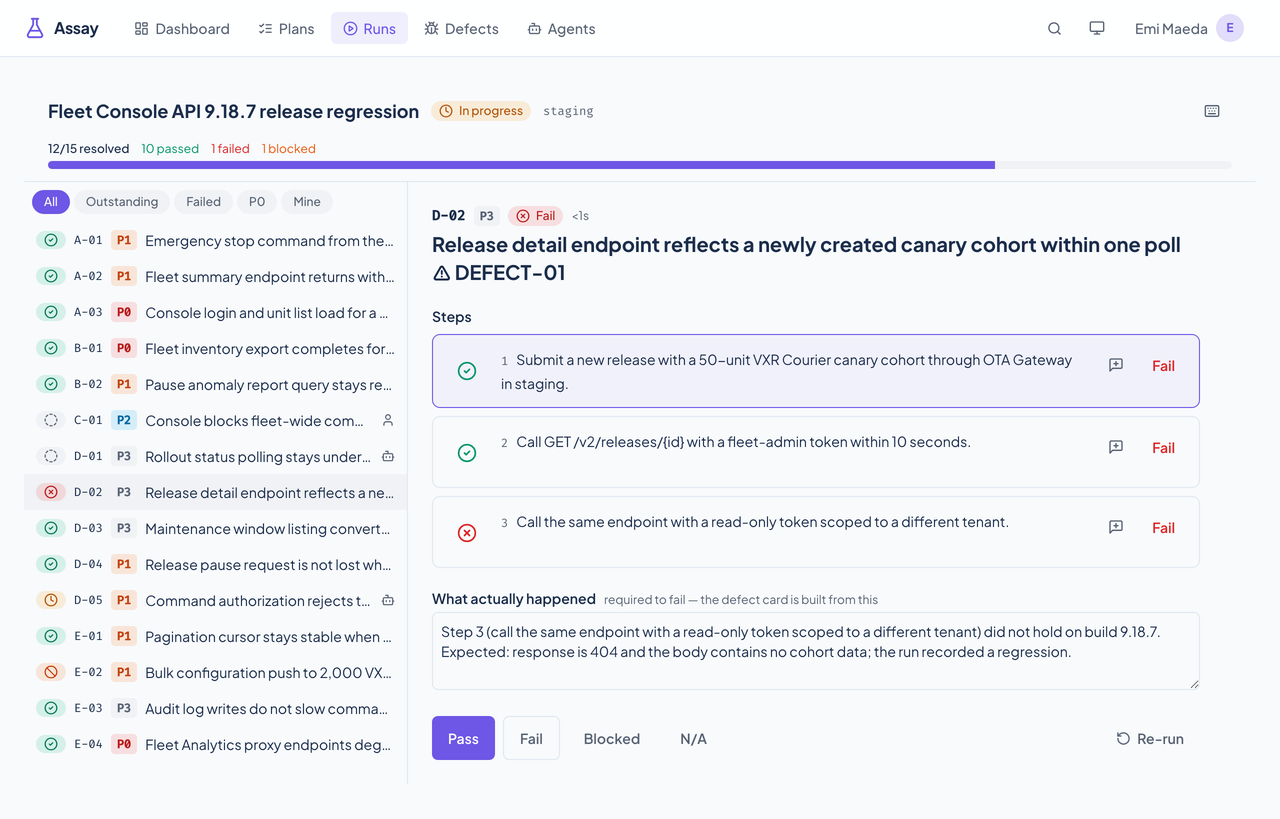
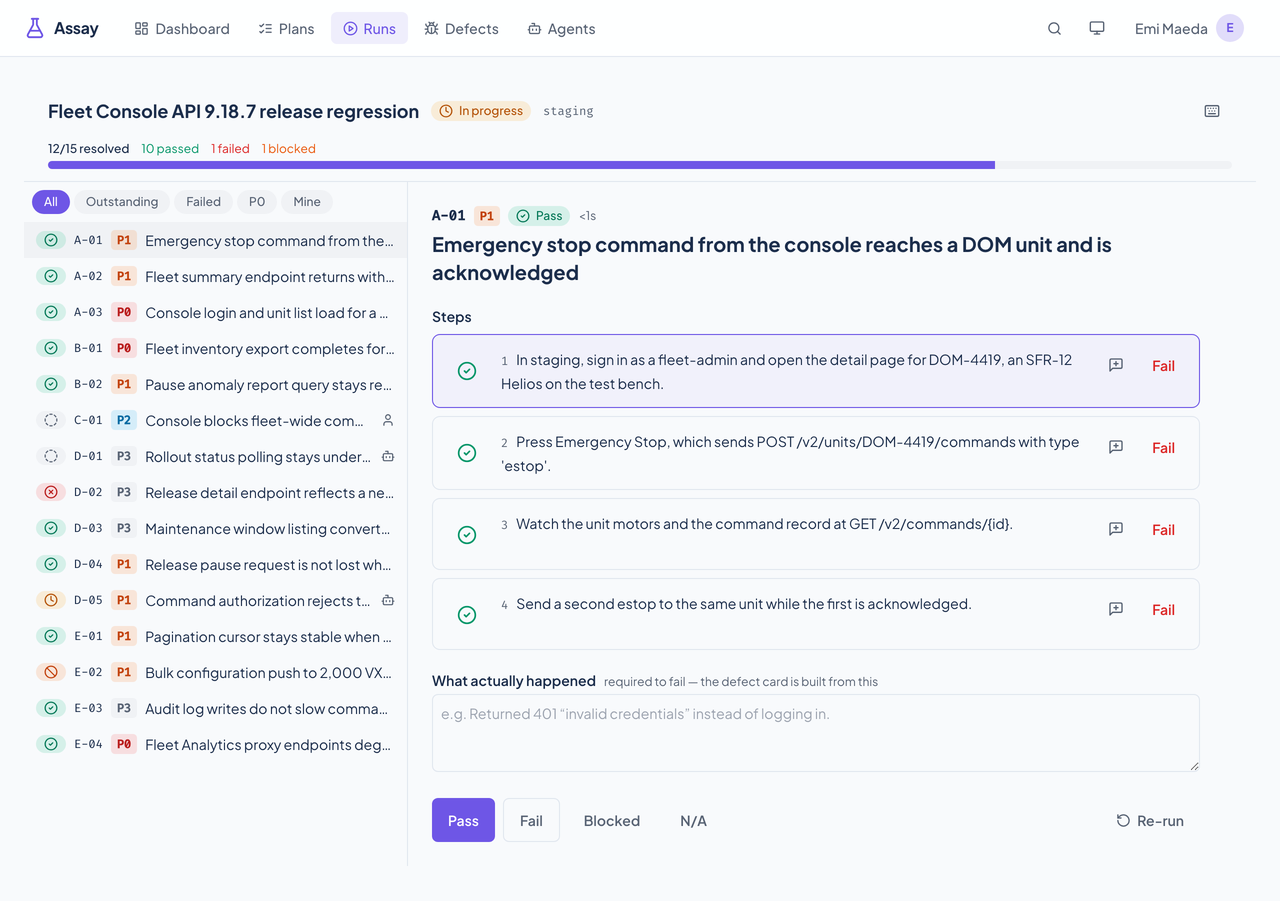
Checking off steps is the difference between "A-07 failed" and "step 4 of A-07 failed, and here is what happened." A case can't be recorded as failed without that description, so the defect that follows is never an empty card.
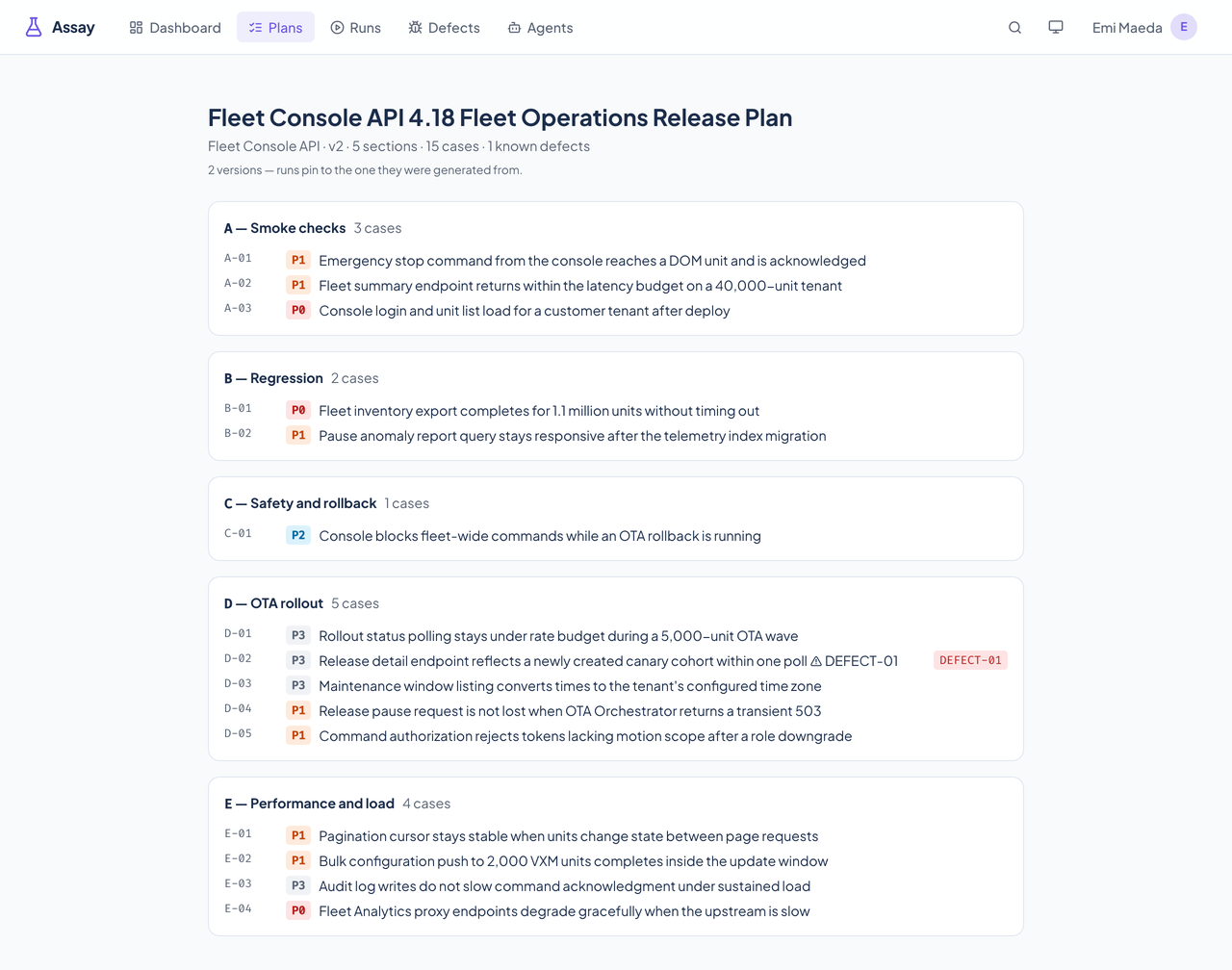
Assay reads the fleet's manual-test-plan format with a deterministic parser and keeps every version. Runs stay on the version they were generated from, so what you tested stays true after the plan changes, and export writes the plan back out as markdown.
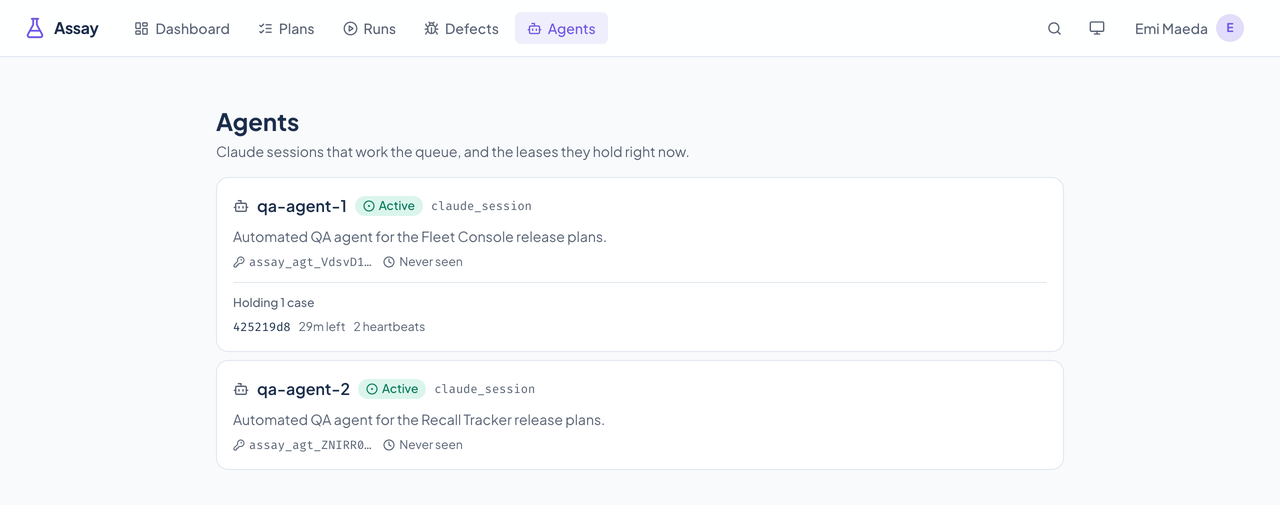
An agent claims one assigned case at a time on a lease and reports every step. If it stops, the lease expires and the case goes back to the queue with its reported steps intact. Failures then link to Docket, and anything that can't reach it is shown, not dropped.
These are the jobs Assay does today. Plans come in as markdown through the importer or the MCP tools; people work runs in the web app; agents claim work through the API and MCP.
Sections, case tables, priorities, defect tags, the environment notes, and appendices are read by a deterministic parser, so the same document always gives the same plan.
Import reports what it found (sections, cases, defect tags, and every warning) and writes nothing until you say so. Importing changed text adds a new version; importing the same text again changes nothing.
Export writes a document a person would accept as the source, and the exporter's tests check that it imports back to the same plan. The plan is never trapped in the database.
Steps split on explicit numbering or semicolons. A split on sentence boundaries is a weaker guess, so the import report marks it for review, and a single step that reads like several is flagged and left whole.
Plan versions are append-only and a run stays on the version it was generated from. Publish a new version mid-run and the run does not move.
The whole plan, P0 and P1 only, the known-defect cases, the agent-executable cases, or the manual-only cases, or your own filter by section, priority, tag, defect tag, or case key.
Check off individual steps, then record the case as pass, fail, blocked, or not applicable. A failure can't be saved without a description of what actually happened.
Move between cases and steps, toggle a step, and record a result without the mouse. Shortcuts are ignored while you type in a text box, and the command palette (Command-K) jumps to a case or a page and carries the verbs for the case you're on.
Hand cases to a person or an agent one at a time, or in bulk by case key, section, priority, or everything unassigned. Your own queue shows on the dashboard, and the run view has a Mine filter.
An agent claims the next case assigned to it, highest priority first, executes it, and reports each step. The claim hands over the steps, the run's environment settings, and the plan's environment notes in one response. Agent results are marked as agent results in the run.
A claim is a lease, not a lock. It runs 30 minutes by default and can be extended up to 4 hours from the first claim. If the agent stops, a sweeper that runs every 30 seconds returns the case to the queue, and every step it already reported stays recorded.
An agent key carries five scopes: read, claim, report, evidence, and comment. It can't author a plan, assign work, or administer anything, and no two agents are handed the same case.
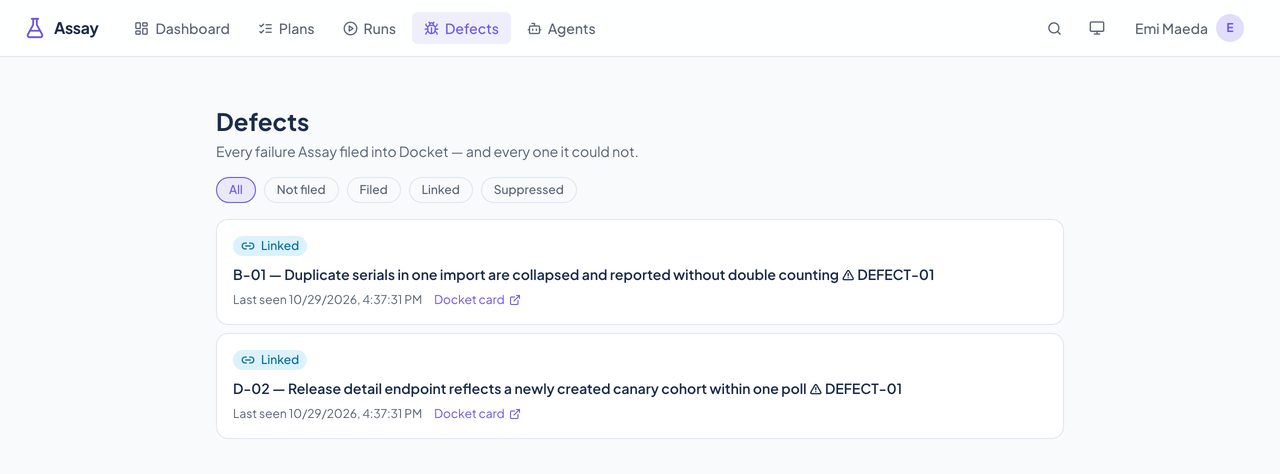
A failed case can be filed as a Docket card with its steps, expected and actual results, and environment, or linked to a card that already exists. A repeat of the same failure comments on its card instead of filing another.
Side effects go through a durable outbox with bounded retries, so a Docket outage never blocks a tester's click. The Defects page leads with anything that never reached Docket and shows the error.
Attach log excerpts, HTTP transcripts, JSON, text, links, or screenshots to a case or a step. Tokens, keys, and authorization headers are redacted before anything is stored, and the patterns that fired are recorded.
When a Chirp webhook is configured, Assay posts when a run starts and finishes, when a P0 or P1 case fails, when a defect is filed, and when a run stalls. It batches the summary, so a long run is not a flood.
Real captures of the running tool, with fictional StrataForge Robotics data. They follow your theme.
Point Assay at a markdown test plan. It parses the sections, cases, steps, priorities, and defect tags, and reports what it found before it writes anything.
Create a run against an environment: the whole plan, just the P0s, or one section. The run pins to that plan version.
Check off steps and resolve cases, or assign them to people and agents who claim and report them.
A failed case becomes a Docket card, or is linked to the one that already exists, with a path back to the case.
Assay's web app is built on the Renkara design system and keeps a keyboard map for working a run. Here is what the product supports today and what has actually been checked. We do not claim a WCAG conformance level for the product, and Assay has no automated accessibility scan yet.
Partly supported
A run can be worked from the keyboard: j and k move between cases, J and K between steps, Space toggles a step, and p, f, b, and n record pass, fail, blocked, or not applicable. Shortcuts are ignored while you type in a text box, and the shortcut sheet opens as a dialog. Command-K opens a command palette.
Partly supported
Case status, assignee kind, and run progress carry text labels (the progress bar has a name and a value, the assignee icons are labeled, and filter buttons report whether they are pressed). Assay has not been run through axe-core and has not been tested with a screen reader.
Partly supported
Assay uses the Renkara design system's light and dark tokens. Its tests recompute the contrast of the violet accent on the light and dark card backgrounds and require 4.5 to 1. No other text or control has been measured, and there is no axe-core color-contrast scan.
Not yet tested
Assay's interface uses the Renkara design system's motion presets, which are designed to honor the reduced-motion setting. Assay's own tests do not check this.
Not yet tested
Resizing text to 200 percent has not been tested.
Partly supported
The dashboard, plans, runs, and run view fit a 375 by 667 phone screen with no sideways scrolling, and the result buttons are at least 36 pixels tall. Assay's own tests do not yet hold every control to 44 pixels.
| Backend |
|
|---|---|
| Web app |
|
| Execution |
|
| Integrations |
|
| Stands in for | Markdown test plans nobody could check off, Failures copied into a tracker by hand |
Failures are filed as Docket cards or linked to existing ones, with the severity taken from the case's priority.
Run starts, completions, P0 and P1 failures, filed defects, and stalled runs post to a Chirp channel through an inbound webhook.
Relays Assay's MCP tools to agents on every machine.
Agents and people author plans as markdown, generate and read runs, assign work, claim and report cases, attach evidence, and link or file defects through Assay's MCP tools.
list_plansget_plancreate_planupdate_planarchive_planimport_plan_markdownexport_plan_markdownlist_plan_versionsget_plan_versionpublish_plan_versiondiff_plan_versionsgenerate_runlist_runsget_runupdate_runget_run_progressexport_runlist_run_casesget_run_caseassign_casebulk_assignget_my_queuelist_agentsregister_agentclaim_next_assignmentheartbeat_claimrelease_claimreport_step_resultreport_case_resultreset_caselist_claimsattach_evidencelist_evidenceretract_evidencelist_defectsfile_defectlink_existing_defectsuppress_defectcheck_service_healthget_diagnosticsAssay is part of Renkara's own tool fleet, and this site shows what it does and how it is built. It is not offered for sale here. Write to contact@renkara.com with questions.
Not today. Plans come in as markdown through the importer script or the MCP import tool, and an agent can write the markdown for you. The web app shows plans and their versions, and it is where runs are worked.
Its lease expires and the case returns to the queue, and every step it already reported stays recorded. A case that keeps losing its claim is blocked with a reason instead of looping.
Only when the plan has a Docket board and auto-filing on. A repeat of the same failure comments on the existing card, and a failure can instead be linked to a card that already exists or suppressed with a reason.
No. Every screenshot is a capture of the running app against fictional StrataForge Robotics data.
Write to Renkara Media Group and a person will answer.